Cosmic Zome Graphics Specs
Hi, thanks for your interest in making graphics for the Cosmic Zome!
There is a lot that goes into it, and it’s constantly being updated
as I figure out new ways to generate content for it.
But here’s the current way things are done.
Here’s some examples to get a feel for the orientation (see the description below).
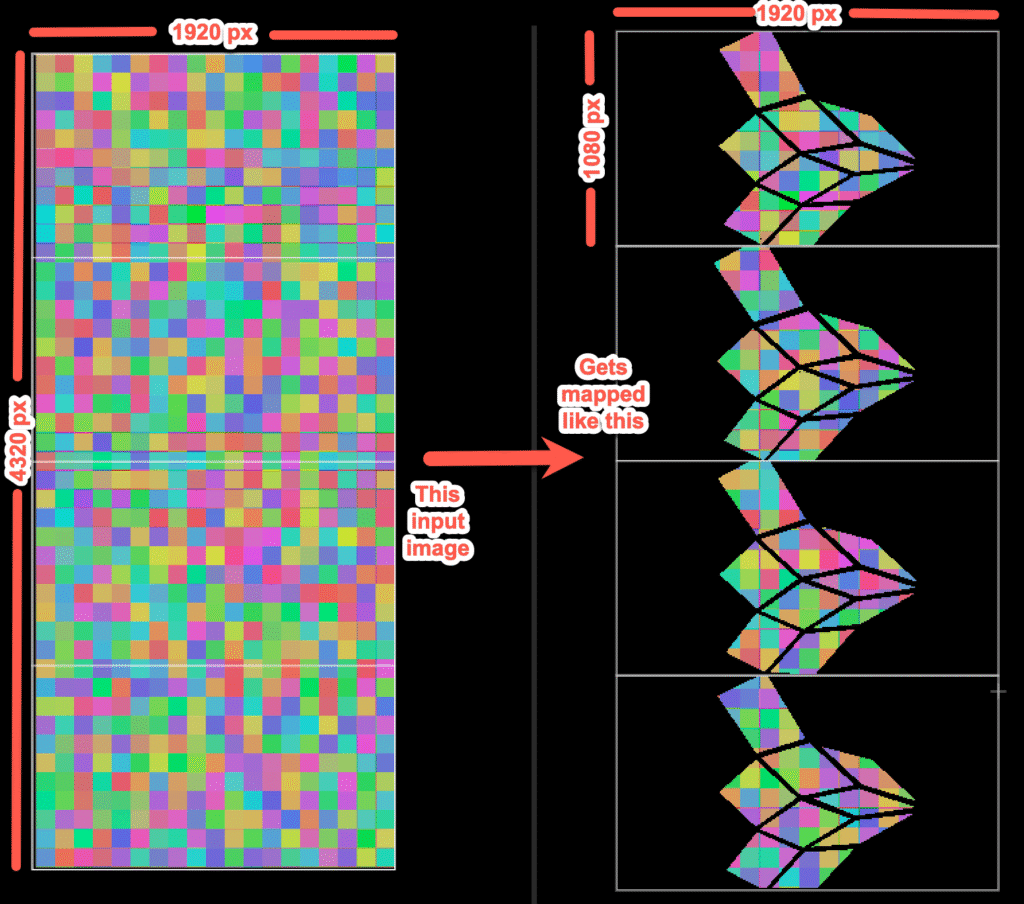
WARNING: Not all pixels get used! The reference images show roughly which pixels get used.
This is not pixel-perfect, so don’t try to make videos that only play on specific panels.
I hope to make a pixel-perfect version of the zome soon that will allow this, but I’m just not there yet.
There are 4 projectors in the zome, each in “portrait” orientation (sideways).
Each projector is 1920 x 1080 (HD).
For technical reasons, a single video has to be used for all 4 projectors.
Therefore each video must be 1920 x 4320 pixels.
The right edge of the video is shown at the top of the zome.
The left edge is of the video is shown at the bottom of the zome.
The bottom 1080 pixels in height are for projector A. The next 1080 pixel above that are for projector B. Etc.
Each projector covers 3 panels in the top 3 layers of the zome.
Abstract patterns with bright colors tend to look the best.
If the image is animated, having things move from right to left make the pattern “fall” on the zome walls.
Likewise, animations that go left to right will “climb up” the walls.
The panels in the zome converge to a single point in the middle at the top of the zome.
So “falling” patterns look like the start in the middle of the zome and fall down.
Likewise, “climbing” patterns go up the walls and meet in the top center.
Videos should be roughly 30 seconds in duration (just a guideline, not a hard cap).
Please keep the file size to a few hundred MB or less.
Videos are shown in a random order with a brief pause in between.
Thanks and LMK if you have questions.
IG: https://www.instagram.com/zzgomusic/
Facebook: https://www.facebook.com/chris.durand.9026/
I don’t have a setup for this, but I’m pretty close. If you are interested in doing this, LMK and we can try to make this happen!
Your laptop will need a driver for it.
But once the driver is installed, you will have 4 HD outputs, one per projector.
I just need to get some long HDMI cables to run to each projector from the box, or maybe try wireless HDMI.